The speaker portal
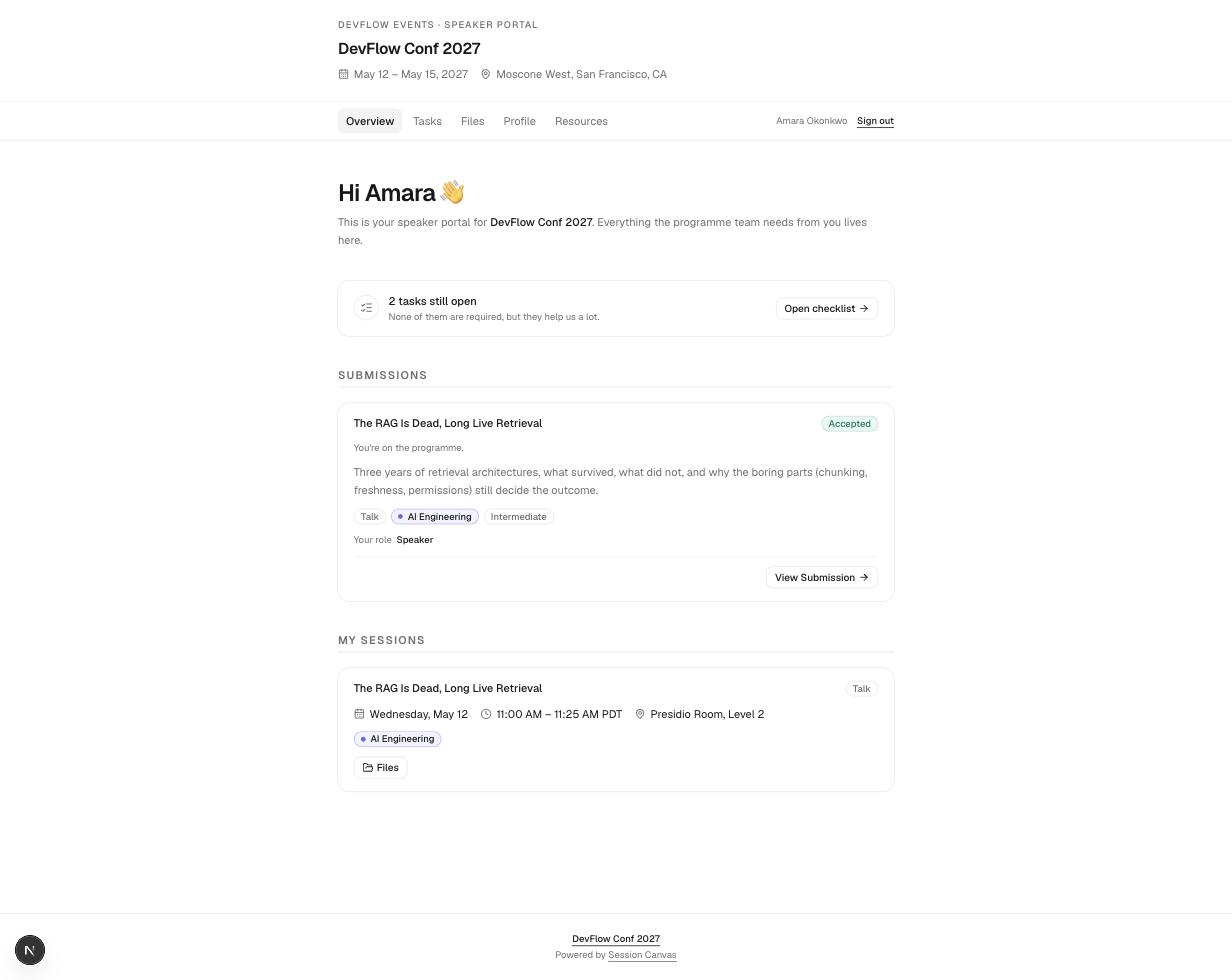
Every speaker gets a self-service home: their submissions and status, their profile, their checklist, and their files — behind a magic link, never a password.
Signing in
Speakers open /portal and enter the email they submitted with — the portal emails them a sign-in link, valid for 7 days, that starts a 30-day session. There is no password, and the same response is shown whether or not the address is on file, so the form can’t be used to fish for who submitted.
- Links are reusable until they expire — re-clicking the email works, and inbox link scanners can’t burn them.
- Organizers can mint a link for anyone: Copy portal link on a speaker’s admin page copies a fresh 7-day link to share directly.
- On a deployment with no email provider configured, the sign-in card shows the link on-screen instead (labelled Demo mode), so the flow stays walkable.
What speakers can do
| Tab | What’s there |
|---|---|
| Overview | Open-task count, every submission with its review status, and scheduled sessions with day, time, and room. |
| Tasks | The checklist assigned from Tasks: tick-off items, links to open, short forms to answer, and file requests to upload against. Works even with JavaScript disabled. |
| Files | Every upload grouped by session, with version history, review status, and a comment thread shared with the organizers. |
| Profile | Name, pronouns, job title, company, bio, headshot, and social links — with a read-only change history underneath. Email is fixed (it’s the identity key). |
| Resources | Guides the programme team publishes: speaker handbook, promotion kit, AV notes. |
Submissions stay editable from the portal while the call for speakers is open — including adding co-presenters (up to 6 people per proposal). Once the form closes, proposals become read-only with a notice saying so.
File uploads
- Accepted: PDF, PowerPoint / Keynote, Word, images (PNG, JPG, WebP, SVG), ZIP, MP4/MOV — up to 50 MB per file. Headshots: PNG, JPG, WebP or GIF up to 10 MB.
- Uploading a new version keeps the full history and puts the file back into Pending review for the organizers.
- A headshot uploaded on the Profile tab updates everywhere at once — the speaker wall, agenda embeds, and the organizer’s record.